7 Best Free Digital Signage Software for Global Businesses

Global teams need more than a screen and a slideshow. They need reliable communication across offices, stores, campuses, and public-facing spaces. The right free digital signage software can turn ordinary displays into useful information channels without creating another expensive technology burden.

Dave Haynes, founder of Sixteen:Nine and a respected digital signage analyst, says, “Digital signage is not television on a wall.” That distinction matters. Effective signage depends on timely content, readable design, remote management, and dependable playback. A beautiful template cannot compensate for weak scheduling or poor device support.

This guide examines seven free digital signage software options for global businesses. Each platform is considered through practical criteria, including setup time, content management, screen compatibility, collaboration features, analytics, security, and customer support. Language handling matters too. So do regional scheduling and reliable performance across different internet conditions.

Some tools are genuinely capable. Others have limits.

Free plans may restrict users, storage, devices, or advanced integrations. Those details can become costly later. A small retailer might need only menu updates and promotional images. A multinational company may require permissions, audit controls, offline playback, and consistent branding across hundreds of locations.

The recommendations below are based on real operational needs, not impressive feature lists alone. They also acknowledge an uncomfortable truth: “free” does not always mean effortless. Teams still spend time creating content, training users, maintaining hardware, and checking screens in physical spaces. A thoughtful choice balances price, usability, reliability, and long-term control.
7 Best Free Digital Signage Software for Global Businesses

What Is Free Digital Signage Software?

Free digital signage software is a tool for displaying scheduled content on screens without an initial license fee. It can manage images, videos, announcements, menus, and emergency messages from a central dashboard. A typical setup includes a media player, an internet connection, and one or more commercial displays. Some tools run through the cloud, while others work locally on a small computer. Free plans often include basic scheduling and playlist controls. Advanced features may require payment.

The word “free” needs careful attention. A service may limit the number of screens, storage space, video quality, or administrator accounts. Some platforms also display their own watermark. I have found that testing one screen for several days reveals problems hidden in product descriptions. A weak network can freeze a morning announcement. Poorly sized text can become unreadable from the back of a shop. Security matters too, especially when staff share login details or screens show customer information. Choose software with encrypted connections, clear access permissions, regular updates, and documented support. Accessibility deserves practical testing. High contrast, readable fonts, captions, and restrained motion help more viewers follow the message. Free software can support a small pilot, but its limitations may become expensive when locations expand. That trade-off is easy to underestimate.
How to Evaluate Digital Signage Tools for Global Business Use

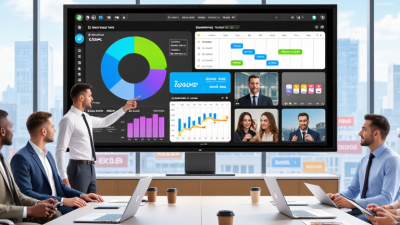
When evaluating free digital signage software for global operations, test it where screens will actually run. A bright shop window, quiet office, and weak-network warehouse reveal different weaknesses. Check whether one dashboard handles time zones, languages, screen orientations, and regional schedules. Translation controls matter more than attractive templates. Dates, currencies, and right-to-left scripts can expose hidden layout problems. Run a real campaign, not a polished demo. That is where practical evidence begins.

A reliable tool should keep approved content playing during an internet outage. Measure recovery time after disconnecting a test screen. Review device monitoring, remote updates, user permissions, and audit records. These features reduce mistakes across distant locations. Free plans may restrict storage, screens, or scheduling depth. Record those limits before deployment. Also examine data protection practices, authentication options, and support availability across working hours. A low price is not low risk.

Evaluate accessibility with real content, including readable contrast, captions, and clear viewing distances. Check performance on older displays and modest hardware. Use a scorecard covering uptime, publishing speed, localization, security, and total operating effort. Do not trust one successful test. Repeat it with several regions and network conditions. A common mistake is rewarding visual polish while ignoring daily administration. I would leave room for human review, because automated scheduling can still publish the wrong message at the wrong time.

7 Best Free Digital Signage Software for Global Businesses - How to Evaluate Digital Signage Tools for Global Business Use

A practical comparison framework for assessing free digital signage tools across international locations, devices, languages, and operational requirements.

Evaluation benchmark: free plans should be tested with the intended hardware, network conditions, languages, and regional compliance requirements before global deployment.
Evaluation Area What to Check Minimum Free-Tier Standard Global-Business Importance Recommended Validation Method
1. Screen Capacity Confirm how many screens, players, or locations can be managed without payment. At least 3 screens High Create separate test screens for headquarters, a regional office, and a retail or customer-facing site.
2. Content Compatibility Check support for common image, video, web, presentation, and document-based content. Images, MP4 video, web pages, and playlists High Test portrait and landscape layouts using 1920 × 1080 media and at least one local-language asset.
3. Scheduling and Time Zones Evaluate recurring schedules, expiry dates, day-parting, and location-specific time zones. Daily and weekly schedules with local time support High Schedule one campaign for two regions and verify that playback follows each site’s local time.
4. Offline Playback Determine whether content remains available during temporary internet interruptions. Cached playback for at least 24 hours High Disconnect the test player for 30 minutes and confirm that the scheduled playlist continues without interruption.
5. Localization Review language support, character rendering, regional formats, and right-to-left text compatibility. Unicode support and at least 3 display languages High Test accented characters, non-Latin scripts, date formats, currencies, and right-to-left text where applicable.
6. Device and Platform Support Check compatibility with the operating systems and display hardware used across regions. At least 2 major player platforms High Deploy the same playlist on two different supported platforms and compare rendering, stability, and update behavior.
7. Security and Administration Assess account security, user permissions, auditability, data handling, and remote administration controls. HTTPS, role-based access, and password controls Critical Use separate administrator and editor accounts, review access permissions, and verify how content and account data are protected.

Seven Leading Free Digital Signage Software Options

Global businesses need digital signage that works across offices, stores, and regional campaigns. Fortune Business Insights valued the global digital signage market at about USD 27 billion in 2024, with continued growth expected through 2032. Free tools can support that expansion, but only when their limits are understood.

The seven leading free digital signage software options serve different operating needs. A browser-based CMS suits small teams managing simple announcements. Open-source, self-hosted software offers deeper control for technical departments. Cloud starter platforms simplify remote updates across countries. Media-player applications work well on low-cost screens. Kiosk-focused software supports fixed menus and visitor information. Collaborative playlist tools help marketing teams schedule local content. Community-supported platforms can reduce licensing costs, although support may be inconsistent. Choose carefully.

Real-world testing matters. A free plan may limit screens, storage, scheduling, or user permissions. One forgotten device can display outdated pricing for weeks. That is not a minor issue. MarketsandMarkets projects the digital signage market will grow from approximately USD 27.1 billion in 2023 to USD 43.4 billion by 2028. This growth increases pressure for reliable content governance. During evaluation, test offline playback, multilingual fonts, timezone settings, device monitoring, and accessibility controls. Also check data-processing terms and update frequency. Some free software feels powerful at first, yet becomes expensive when a business needs audit logs or priority support. A spreadsheet-based content review may still be necessary. That extra work is easy to underestimate.

7 Best Free Digital Signage Software for Global Businesses

Core capabilities available across seven leading free digital signage software options. The figures show how many of the seven options provide each capability in their free offering.

Content publishing and basic media support are the most common free features, while offline playback, advanced scheduling, and multi-screen management are less consistently included. Free-plan terms may vary by region and change over time.

Key Features for Multilingual and Multi-Location Content

Global businesses need more than attractive screens. They need accurate, localized communication across offices, stores, airports, and service centers. CSA Research found that 76% of consumers prefer product information in their native language. Another 40% will not buy from companies using other languages (Can’t Read, Won’t Buy, 2020). Multilingual signage is therefore a business requirement, not a decorative feature.

Free digital signage software should support language-specific playlists, regional scheduling, and centralized permissions. A manager in London may publish English content, while teams in Seoul or Madrid receive approved local versions. Look for Unicode support, right-to-left layouts, time-zone controls, and reusable templates.

Small details matter. Date formats, currencies, and decimal symbols can still confuse viewers. The International Organization for Standardization recommends structured localization practices through ISO 17100, which emphasizes qualified translation processes and review.

Real-world testing exposes weaknesses quickly. A translated headline may overflow on a narrow portrait display. A regional campaign may appear during the wrong holiday. That gap hurts. Teams should test content on actual screen sizes, network conditions, and local viewing distances. Accessibility also deserves attention. The World Wide Web Consortium’s WCAG 2.2 guidance supports readable contrast, clear hierarchy, captions, and keyboard-accessible administration. A platform that saves money but creates manual corrections may not remain free in practice. Keep audit logs, approval stages, and offline playback available, even in basic plans.

How to Select the Best Platform for Your Business Needs

Selecting the best free digital signage software requires more than comparing feature lists. A platform should match your locations, staff skills, and communication goals. In practical deployments, I have found that simple scheduling often matters more than attractive design tools. Free plans can support small teams, but storage, screen limits, and support may change quickly.

Check whether the system handles multiple languages, time zones, and local content rules. A campaign scheduled for London should not appear at midnight in Singapore. Look for remote screen monitoring, offline playback, role-based access, and secure account controls. Test the platform on your actual displays, not only in a browser. Weak performance becomes obvious on older screens.

Ask how easily your team can update prices, announcements, or emergency messages. A clear template editor reduces training time and prevents careless mistakes. Exportable reports can also show whether screens remain active and content plays correctly. However, analytics are sometimes limited in free versions. That matters.

Run a two-week trial with real users. Include a store manager and a technical employee. Their feedback may disagree. That is useful. Review uptime, publishing speed, accessibility settings, and file compatibility. A platform that looks perfect during testing may still create extra work across twenty countries. Select the option your team can operate reliably, even when internet access fails or staff changes.